AI-Powered Extension Generator for Visual Android Development
This video showcases an intelligent solution that uses artificial intelligence to simplify and speed up the creation of custom extensions for visual Android app development environments.
Through natural language interaction, the system understands project structures, components, and logic, then automatically generates Java-based extensions tailored to specific needs. It can analyze uploaded project files, interpret schemas, and propose multiple optimized extension alternatives for the developer to choose from.
Key features:
Conversational creation of extensions
Automatic analysis of components and properties
Generation of multiple extension ideas and implementations
Scalable, clean, and professional architecture
Ideal for learning, teaching, and real-world app development
This approach removes technical barriers and empowers creators to extend visual apps with advanced native features, combining simplicity with professional-grade results.
Watch the video and discover how AI can elevate visual Android development to the next level.
Error: ENOENT: no such file or directory, open '/tmp/ext_xxx/assets/images/media.png
Here’s a clean and clear version in English, tailored for AixGenerator documentation or guidelines:
Icon Reference Requirement for AixGenerator Extensions
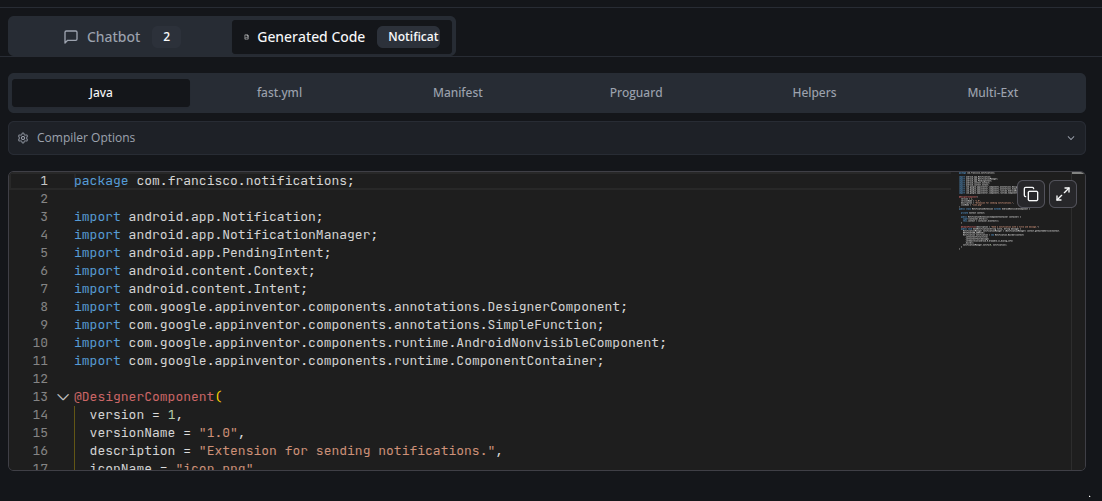
In AixGenerator, the icon reference in extensions must always be declared exactly as shown below:
@DesignerComponent(
        version = 1,
        description = "Simple extension to convert words (pt-BR) into integer numbers (long)",
        category = ComponentCategory.EXTENSION,
        nonVisible = true,
        iconName = "icon.png"
)
Important rule
The icon file must be named exactly:
icon.png
And it must be correctly included in the extension assets.
No other file name or path should be used.
Common Error and How to Fix It
If you encounter an error similar to the one below:
{
  "error": "ENOENT: no such file or directory, open '/tmp/ext_26398728_2ca9eed9-ba47-4bf5-964b-aef11a9d1022_1769270441883/assets/images/media.png'",
  "fastLogs": "",
  "packageName": "com.goshitv.exovideoplayer",
  "extensionName": "ExoVideoPlayer"
}
What this means
This error usually indicates that the extension is trying to load an icon file that does not exist or is incorrectly referenced.
What the user must check
Ensure the icon file is named exactly: icon.png
Ensure the annotation uses:
iconName = "icon.png"
Make sure the file is present in the correct extension assets directory
Tip
Most ENOENT icon-related errors in AixGenerator are caused by:
Wrong icon file name
Wrong icon path
Using a name different from icon.png
Keeping this standard avoids build and packaging issues.


 Important rule
 What this means
 Tip
Tip