Hello everyone,
After the latest AndroidBuilder update, I’m facing a serious UI overlapping issue in my app.
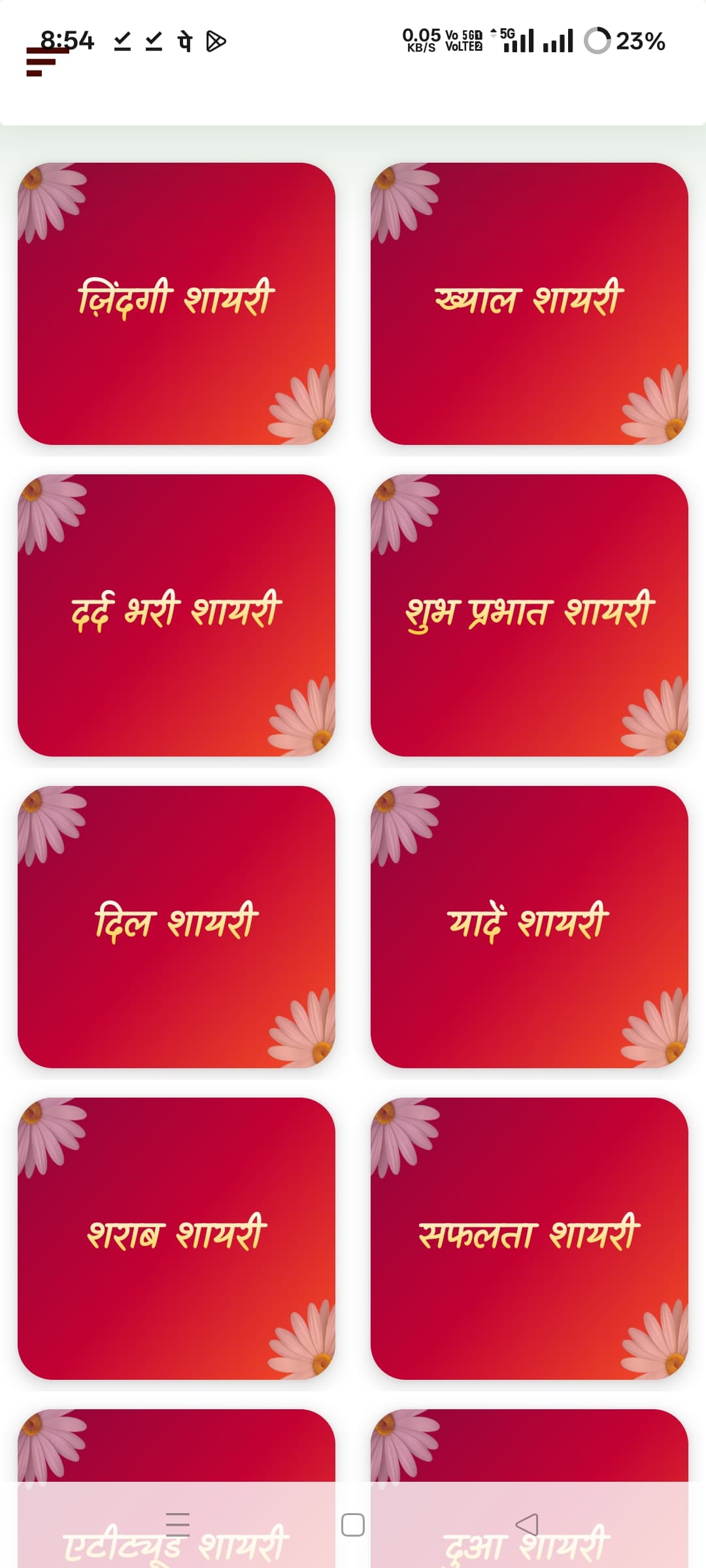
As you can see in the screenshot (attached),
the Status Bar area and top Arrangement are getting merged together —
it looks like the layout background (gradient red with flower corner) has shifted behind the status bar.
The same problem also appears at the bottom, where the Navigation Bar overlaps with the background.
I tried the following but the issue still remains:
Enabled “Show Status Bar” and “Show Navigation Bar”
Changed Sizing to “Responsive”
Used both SetStatusBarColor and SetNavigationBarColor blocks
Adjusted padding and margin for top Arrangement
Disabled gradient and rounded view extensions
Still, the layout mixes with system UI after building the app (works fine in preview).
 I think the new update might have enabled full screen mode by default or changed system UI insets behavior.
 My Questions:
-
Is this a known bug in the new AndroidBuilder update?
-
Any workaround to separate Status Bar and Arrangement background again?
-
Should I manually add padding or wait for a patch?